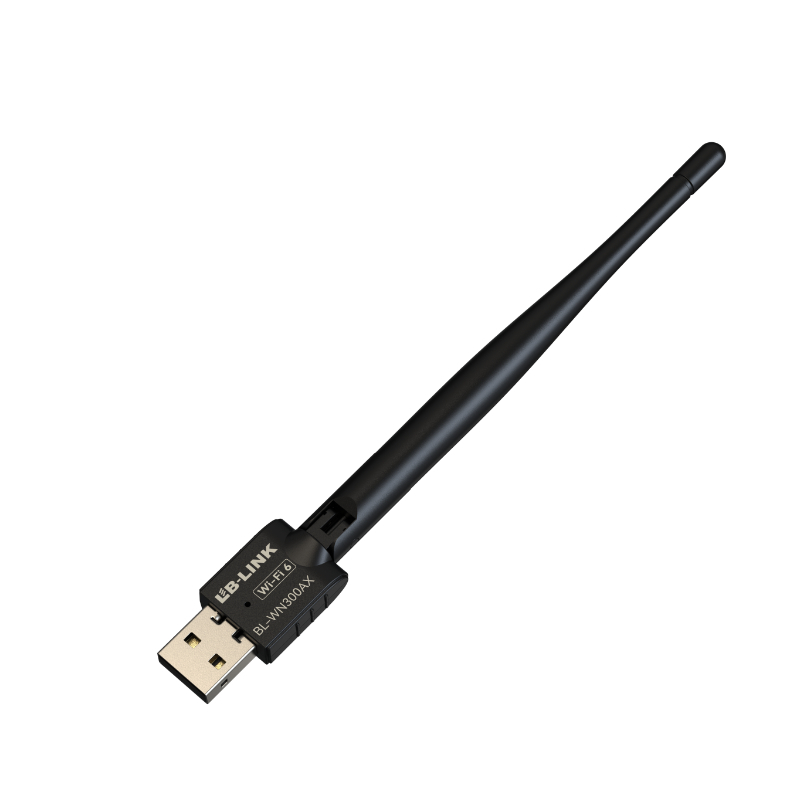
A Long-Range WiFi 6 adapter with high-gain antennas can improve reception when a laptop or desktop is separated from the router by distance, furniture, or moderate obstacles. It cannot repeal radio physics. Walls absorb energy, interference consumes airtime, and a poor router location can limit both sides of the link. High antenna gain also does not mean unlimited range or higher transmitter power. The correct choice combines antenna pattern, placement, band, interface, driver support, router capability, and WPA3 security. Buyers should define the difficult location first, then validate the complete link under the same conditions in which the adapter will operate.
Key Takeaways
Choose adjustable external antennas when placement and orientation matter more than pocket-size portability.
Evaluate antenna gain together with radiation pattern, cable loss, radio streams, and router location.
Use 2.4 GHz for greater reach when necessary and 5 GHz where signal strength supports higher-capacity operation.
Confirm WPA3 on the adapter, router, operating system, and final network configuration.
Test packet loss, stability, and loaded latency at the target location instead of relying on a peak speed result beside the router.
Define “Long Range” for the Actual Site
Range is not a fixed product radius. A clear hallway, reinforced concrete wall, metal cabinet, floor slab, warehouse rack, and neighboring access point create very different radio paths. Even people and doors can change multipath conditions. A useful requirement therefore describes the environment: distance, number and type of obstacles, router position, required application, and competing networks.
The application defines acceptable performance. Email and ordinary browsing tolerate lower throughput. Video meetings require sustained bidirectional stability. Cloud backups need capacity over time. Online games care about jitter and packet loss. A point-of-sale or industrial terminal may value reconnection behavior and driver stability above peak rate.
Measure the current condition before buying. Record signal level, band, link rate, throughput, latency, loss, and dropouts at the problem location. Repeat during busy periods. This baseline reveals whether the likely constraint is weak signal, interference, router load, broadband service, or the existing client radio.
Weather and building use can also change conditions in semi-outdoor, warehouse, or large commercial spaces. Closed fire doors, moving inventory, machinery, and temporary access points may alter the radio path. A representative site survey should therefore cover normal operating hours rather than a single quiet test. Where continuous connectivity is operationally important, define a fallback path and monitor connection quality after installation instead of assuming that initial commissioning proves every future condition.
What High-Gain Antennas Really Do
Antenna gain describes how energy is concentrated relative to a reference pattern. An omnidirectional antenna with greater gain often flattens its vertical pattern, directing more energy horizontally rather than creating new power. That can help devices on a similar floor while being less suitable for coverage above or below.
The value of an external antenna is often placement flexibility. A desktop case under a metal desk can shield a small internal or rear-mounted antenna. A cabled base can move the antenna above the desk or away from noise sources. Adjustable elements also allow polarization and orientation changes.
Gain figures should not be compared without context. Connector loss, cable length, antenna efficiency, radio design, regulatory limits, and pattern all affect the completed system. Two moderate antennas in a 2T2R arrangement may support spatial diversity and MIMO behavior that a single large antenna cannot replace.
Do not assume the antenna solves a one-way link. WiFi communication requires the router to hear the client as well as the client to hear the router. A strong access-point signal shown by the PC does not guarantee adequate uplink quality. Upload tests and bidirectional applications expose this mismatch.
Band Choice: Reach Versus Capacity
The 2.4 GHz band usually travels farther and penetrates common obstacles better than 5 GHz. It is also widely used and has limited non-overlapping channel space, so congestion may be severe. The 5 GHz band offers more channel choices and often higher throughput, but it attenuates faster through walls.
A long-range adapter should support both bands so the deployment can choose based on evidence. Close to the router, 5 GHz may deliver the best capacity. At the edge of coverage, 2.4 GHz may maintain a more reliable link. The higher link-rate band is not automatically the more stable option.
Channel width matters as well. Wide channels increase theoretical capacity but occupy more spectrum. In a crowded site, a narrower clean channel can produce fewer retransmissions and better consistency. The router controls much of this decision; the adapter must support the selected configuration.
The LB-LINK AX1800 USB 3.0 WiFi 6 adapter combines stated dual-band operation, two antennas, beamforming, USB 3.0, WPA3, and Windows 11/10 compatibility. Those characteristics form a relevant long-range shortlist, but site testing remains necessary.
Beamforming, MIMO, and WiFi 6 Efficiency
Beamforming uses signal processing to direct transmission energy more effectively toward a connected device under suitable conditions. It can improve link quality, but it is not a narrow physical beam that ignores all obstacles. Router and client support, channel information, reflections, and movement influence the result.
MIMO uses multiple radio chains and antennas to improve reliability or carry spatial streams. A 2T2R adapter can use two transmit and two receive paths, subject to the negotiated link and environment. Antenna separation and orientation affect performance, so folding both antennas against a metal surface wastes some of the design’s potential.
OFDMA and MU-MIMO address efficiency when several devices share a compatible WiFi 6 network. They may improve responsiveness under load, but they do not amplify a weak signal. At the coverage edge, solving placement and signal quality comes first.
WPA3 Security Must Be End-to-End
WPA3 security strengthens modern WiFi authentication and protection, but an adapter’s WPA3 capability is only one part of deployment. The router or access point, firmware, operating system, and driver must also support the chosen mode. A network configured only for an older protocol will not gain WPA3 protection because the client specification mentions it.
Compatibility modes can help mixed fleets migrate, yet they may not enforce the same security posture for every client. Organizations should define whether WPA3-Personal, an enterprise configuration, or a transition mode is required. The exact security choice depends on network policy and infrastructure.
Avoid disabling security to troubleshoot a range problem. Encryption mode can affect connection compatibility, but an open network introduces a different risk and does not repair poor RF design. Test with the security configuration intended for production.
Long-Range Adapter Decision Table
Factor
Favorable evidence
Warning sign
Verification
Antennas
Adjustable, documented configuration
Gain number without pattern or layout context
Test orientation at target desk
Placement
Extension or base clears metal obstacles
Dongle trapped behind the case
Compare several physical positions
Bands
Dual-band support
Single-band assumption
Test 2.4 GHz and 5 GHz separately
Interface
USB 3.0 for higher-class USB models
Unknown hub or USB 2.0 port
Inspect host controller and port
Security
WPA3 supported across client and router
Adapter-only WPA3 claim
Confirm negotiated network mode
Drivers
Exact OS and revision documented
Generic compatibility statement
Install on the intended OS image
Stability
Low loss and consistent latency
One exceptional speed-test peak
Repeat tests under realistic load
Installation and Placement Method
Install the verified driver and connect the adapter directly to the appropriate host port. For a USB 3.0 model, avoid an unverified USB 2.0 hub. If the adapter uses a cable or base, begin above desk height with a relatively clear path toward the router.
Move the antenna system incrementally and record results. Rotate elements rather than assuming vertical is always optimal. Test with doors in normal positions and typical devices active. Do not judge placement through signal bars alone; compare upload and download stability, latency, jitter, and loss.
Keep the adapter away from heat accumulation and excessive mechanical strain. A long dongle directly connected to a laptop port can be vulnerable to impact. A base adds flexibility but introduces cable loss and desk-management considerations. Use the supplied or specified cable rather than an arbitrary long extension.
If no placement delivers acceptable service, reconsider network architecture. Moving the router, adding a properly wired access point, using mesh backhaul, or installing Ethernet may be more reliable than increasing client antenna gain. The adapter cannot compensate for every building or interference condition.
What B2B Buyers Should Confirm
For resale or integration, confirm antenna count, gain and connector configuration, radio streams, bands, USB or PCIe interface, WiFi standard, security modes, OS support, driver delivery, hardware-revision control, packaging, and regional requirements. Do not substitute an antenna claim for completed-system testing.
Regulatory requirements can depend on the destination market and completed antenna system. Buyers should request the applicable documentation for the exact model, region, and antenna configuration rather than assuming that a similar product or chipset covers the order. Any external-antenna substitution should be reviewed because gain and connector changes may alter the approved configuration.
Create acceptance locations that represent the target use cases. Test through the expected obstacles and with realistic competing traffic. Document the router, firmware, channel, bandwidth, distance, and client driver. This produces a reproducible basis for comparing samples.
LB-LINK Electronics Co., Ltd. provides adapter product categories alongside factory and production information, supporting evaluation as a manufacturer and supplier. Buyers can review its high-gain WiFi adapter options and then request exact model confirmation for antennas, security, systems, and revision requirements.
Troubleshooting a Weak Long-Range Result
If a new adapter performs poorly, begin with the simplest checks. Confirm that the computer selected the new interface, installed the correct driver, and joined the intended access point and band. Verify that a USB 3.0 model is not operating through a slow hub. Inspect antenna connectors and place adjustable antennas clear of the chassis.
Next compare the link close to the router and at the difficult location. Good nearby performance but weak remote performance points toward propagation, interference, or placement. Poor performance in both locations suggests a driver, port, router, or device problem. Test upload as well as download because uplink weakness can be hidden by a strong received signal indication.
Check whether competing traffic creates delay. Pause cloud backups and large transfers temporarily, then repeat the test. If latency improves only when the network is idle, router queue management or additional access-point capacity may be needed. Keep a record of each change so a temporary improvement can be traced to its cause.
Conclusion
A Long-Range WiFi 6 adapter with high-gain antennas should be selected as part of a complete radio link. Antenna gain helps only when pattern, position, bands, router capability, and uplink quality also fit the site. Confirm WPA3 end to end, use a suitable host interface, and test both bands at the real problem location. If structural obstacles or congestion dominate, change the network architecture rather than expecting the client adapter to overcome everything. LB-LINK models should be compared through documented specifications and reproducible site tests, not range claims alone.
FAQs
Does a higher-gain antenna always provide longer WiFi range?
No. Higher gain changes the radiation pattern and may favor certain directions. Placement, cable loss, antenna efficiency, router location, obstacles, and regulatory limits all affect usable range.
Is 2.4 GHz always better for long-distance reception?
It generally propagates better through obstacles, but congestion can make it unstable. Test it against 5 GHz at the target location using the intended workload.
Can a WiFi 6 wireless adapter improve a weak upload?
It may help through better antennas or placement, but the router must also receive the client clearly. A one-way signal imbalance may require moving the router or access point.
Does WPA3 reduce WiFi range?
WPA3 is a security protocol rather than a range feature. Compatibility problems can prevent connection, but it does not directly determine propagation distance.
Is a USB extension useful for a high-gain adapter?
A suitable extension or base can move the adapter away from a shielded PC case. Use a data-capable cable of appropriate quality and avoid unnecessary length.
Guangming District, Shenzhen, as a research and development and market service base, and equipped with more than 10,000m² automated production workshops and logistics warehousing centers.