An aging laptop or desktop may still run everyday software well while its wireless connection feels slow, unstable, or congested. A WiFi 6 wireless adapter can modernize that connection without replacing the motherboard or the entire computer. The practical challenge is choosing a USB model that fits the available port, operating system, router, room layout, and workload. “Plug-and-play” also needs careful interpretation: it may mean automatic driver installation on one operating system, while another system still needs a downloaded driver. A good decision therefore starts with compatibility and use conditions, not the largest speed number printed on a package.
Key Takeaways
Match the adapter to the computer’s USB port, operating system, router standard, and available 2.4 GHz or 5 GHz bands.
Treat advertised wireless speed as a link-class figure, not a guarantee of internet throughput.
USB 3.0 helps prevent the wired interface from becoming an avoidable bottleneck on faster WiFi 6 models.
External or adjustable antennas usually offer more placement flexibility, while compact dongles prioritize portability.
Confirm what “plug-and-play” means for the exact hardware revision and operating system before a volume purchase.
Start with the Upgrade Problem, Not the Adapter Label
The right USB adapter depends on what is wrong with the current connection. If an older notebook supports only 2.4 GHz WiFi, adding a dual-band adapter may provide access to a cleaner 5 GHz channel near the router. If a desktop sits under a metal desk, the main issue may be antenna position rather than protocol generation. If video calls fail whenever several household devices become active, WiFi 6 traffic-management features may help, but only when the router also supports them.
Separate internet speed from local wireless performance. The internet plan, router, walls, interference, server load, and computer all influence a speed test. Replacing the adapter cannot raise a slow broadband plan above its service limit. It can, however, improve the wireless link between the PC and a compatible router, reduce a legacy-client bottleneck, or provide better antenna placement.
The upgrade goal should be measurable. Examples include maintaining stable video calls in a home office, improving file transfers to a local network drive, connecting an older desktop to a dual-band router, or reducing dropouts in a room with moderate interference. Once the problem is clear, specifications become decision tools rather than marketing decorations.
Why USB 3.0 Matters in a WiFi 6 Wireless Adapter
A USB adapter contains a wireless radio, but all network traffic must also cross the USB connection into the computer. USB 3.0 provides substantially more interface capacity than USB 2.0, making it the sensible match for higher-class WiFi 6 adapters. It does not make the router faster, and it does not guarantee the advertised wireless rate. Its value is that the physical host interface is less likely to impose a low ceiling on an otherwise capable adapter.
Port identification deserves attention. Many computers use blue inserts to mark USB 3.x Type-A ports, but color is not universal. The operating-system device manager or the PC specification sheet is more reliable. A Type-C port is also not automatically high speed; the connector shape and the data standard are separate facts. If a hub or extension cable sits between the adapter and computer, that accessory must support the required data rate and deliver stable power.
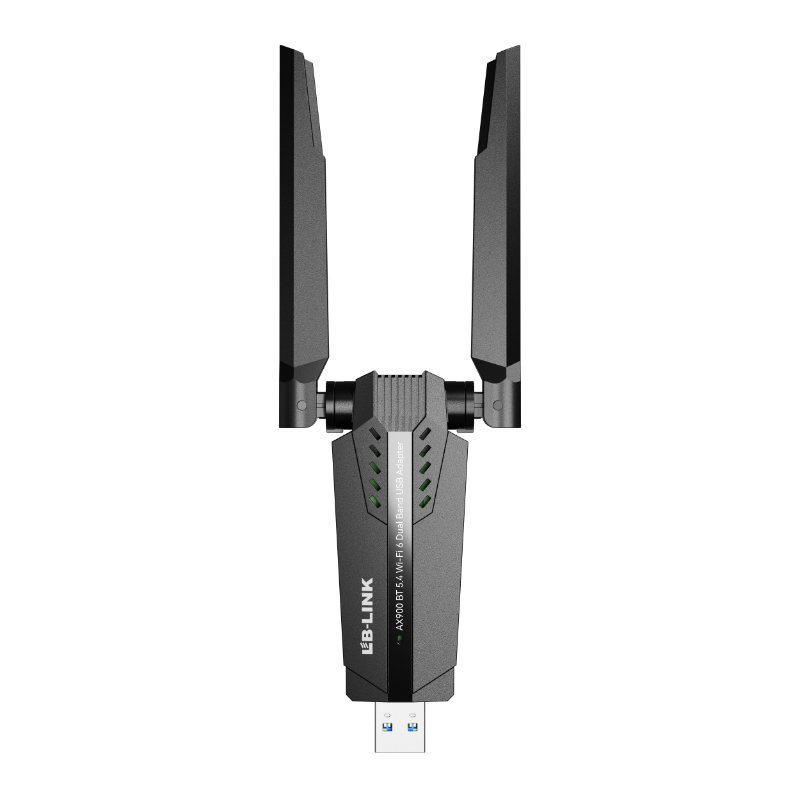
The LB-LINK AX1800 USB 3.0 adapter illustrates the specification combination buyers commonly seek: dual-band WiFi 6, a USB 3.0 host interface, high-gain antennas, beamforming, WPA3 support, and stated Windows 11/10 compatibility. Those facts should still be matched to the deployment rather than treated as universal suitability.
Check WiFi Bands, Router Support, and Channel Conditions
A dual-band USB 3.0 WiFi 6 adapter normally works on 2.4 GHz and 5 GHz. The two bands solve different problems. The 2.4 GHz band generally travels farther and penetrates obstacles more effectively, but it is often crowded by neighboring networks and other devices. The 5 GHz band provides more channel capacity and may support higher throughput, yet signal loss through walls is usually greater.
WiFi 6 can operate on both bands, but the router determines which features and channels are available. A WiFi 6 USB 3.0 dongle remains backward compatible with many older routers, although the connection then uses the capabilities shared by both ends. Buying an AX-class adapter will not transform a WiFi 5 router into WiFi 6. For the full upgrade, confirm the router standard, band configuration, encryption mode, and channel width.
Avoid choosing only by an “AX1800” or similar class label. Such labels typically combine theoretical maximum link rates across bands; the client does not use both band totals as one ordinary single-device connection. Real throughput is lower because WiFi carries protocol overhead and shares airtime. Distance, interference, antenna orientation, router capacity, and channel width further change results. A class label is useful for comparing broad product tiers, not predicting an exact speed in a particular room.
What Plug-and-Play Should Mean in Practice
Plug-and-play can describe several installation experiences. An operating system may already contain a compatible driver and configure the device automatically. An adapter may expose an integrated driver installer. A vendor may provide a downloadable driver package. These routes are not identical, and none should be assumed across every Windows, macOS, or Linux version.
Before buying, confirm five items: the supported operating-system editions, whether 32-bit or 64-bit matters, the exact hardware revision, the driver delivery method, and whether administrator privileges are required. Business buyers should also check whether endpoint-security policies permit removable network devices and driver installation. A user working on a managed office PC may be unable to install a driver even when the hardware is technically compatible.
The phrase also does not eliminate network setup. The user must still select the correct SSID, enter credentials, and sometimes disable or reprioritize the old internal adapter. WPA3 may require updated router firmware and operating-system support. If the network runs a WPA2/WPA3 transition mode, confirm that the intended security level is actually negotiated.
For fleets, test a sample on every planned OS image before placing a wholesale order. Driver behavior can differ between hardware revisions sold under a similar retail name. Record the device identifier, driver version, installation route, reboot requirement, and rollback method. That small validation step prevents “plug-and-play” from becoming a support-ticket multiplier.
Choose the Physical Design for the PC and Room
Nano adapters remain close to the laptop body, are easy to carry, and are less likely to be knocked during travel. Their compact antennas and proximity to the chassis can limit placement options. Larger adapters may provide better thermal area or antenna structures but occupy adjacent ports. Models with an extension cable or desktop base let the user move the radio away from a metal case and place the antenna above a desk.
External high-gain antennas can improve reception in some layouts, especially when they can be oriented or moved to obtain a clearer path. Gain is not extra transmitter power; it describes how an antenna concentrates energy in particular directions. A larger gain number is not automatically better in every room. Orientation, polarization, cable loss, router location, and multipath reflections all matter.
Desktop users should check physical clearance around neighboring USB ports. Laptop users should consider leverage: a long adapter can place stress on a port if bumped. In shared offices or public environments, a cabled base may be easier to position but harder to secure. A suitable design balances reception, durability, portability, and cable management.
Compare Specifications as a System
Decision factor
What to verify
Why it matters
Common mistake
USB interface
USB 3.0 support on both adapter and host port
Avoids an unnecessary host-interface limit
Plugging a fast adapter into a USB 2.0 hub
WiFi bands
2.4 GHz and 5 GHz support
Balances range, congestion, and throughput
Assuming 5 GHz always reaches farther
Router capability
WiFi generation, channels, WPA mode
Determines the shared feature set
Expecting WiFi 6 features from an older router
Antenna design
Internal, external, adjustable, or cabled
Changes placement and reception options
Choosing solely by gain number
Drivers
Exact OS and hardware-revision support
Determines whether installation succeeds
Treating “plug-and-play” as universal
Security
WPA3 support and backward compatibility
Helps align the client with network policy
Ignoring router and OS security support
Form factor
Port clearance and travel exposure
Affects usability and mechanical risk
Blocking an adjacent port
No row should be assessed in isolation. A high wireless class paired with an old router or poor signal may underperform a modest adapter placed well. Conversely, a stable mid-tier link may be entirely sufficient when the broadband connection is the limiting factor.
Installation and Validation Steps
First, download or preserve the existing network driver if the computer has only one working connection. Create a restore point where appropriate and note the current adapter settings. Then connect the new device directly to a verified USB 3.0 port rather than an unknown hub. Allow the documented driver process to finish and restart only if required.
After installation, verify that the PC joined the intended band and access point. Check the negotiated link rate, but do not confuse it with application throughput. Run repeated tests at the same location and time against the same local or internet endpoint. Compare latency, packet loss, upload stability, and download speed, not merely one peak result.
Test the applications that motivated the upgrade. A video conference is sensitive to sustained latency and loss. A local backup emphasizes throughput. General browsing may reveal little difference once basic capacity is sufficient. Move an adjustable antenna or cabled base in small steps and retest; placement can matter more than a specification upgrade.
If performance is disappointing, verify the port mode, driver version, router band, channel congestion, power-management settings, and distance. Disable the old internal WiFi temporarily to prevent route confusion. Do not disable security features merely to chase a higher benchmark.
Buying for Distribution or Project Deployment
B2B procurement adds questions that individual retail reviews rarely answer. Ask for the exact chipset or device identifier when driver standardization matters. Confirm hardware-revision control, supported operating systems, packaging language, labeling, antenna configuration, and the availability of current driver packages. If products will be bundled with PCs, validate mechanical clearance and thermal behavior in the final system.
Consistency is often more valuable than a headline rate. A supplier should be able to identify the tested configuration and distinguish a production specification from a theoretical standard maximum. Sample approval should cover sleep and wake behavior, roaming, sustained transfer, reconnect after reboot, coexistence with Bluetooth peripherals, and performance through the actual office or home layout.
LB-LINK Electronics Co., Ltd. presents USB WiFi adapters within a broader networking portfolio and provides product-specific interface, band, antenna, security, and system-compatibility information. Buyers can use the USB WiFi adapter range to shortlist form factors before requesting confirmation for a particular deployment.
Conclusion
The best plug-and-play upgrade is not simply the WiFi 6 wireless adapter with the highest printed rate. It is the model whose USB interface, driver path, operating-system support, bands, security, antenna design, and physical format fit the actual PC and network. Verify that the host port is USB 3.0, confirm what installation requires, and test a sample with the intended router and workload. LB-LINK can be evaluated as a manufacturer and supplier by the same practical standard: documented compatibility, repeatable hardware identification, and a product configuration that solves the buyer’s real connection problem.
FAQs
Can a WiFi 6 USB adapter work with a WiFi 5 router?
Usually, yes. WiFi standards are designed with backward compatibility, so the adapter can negotiate a common mode with an older router. The connection will not gain router-side WiFi 6 functions, and performance will be limited by the capabilities shared between the adapter and access point.
Does USB 3.0 increase internet speed by itself?
No. USB 3.0 increases the capacity of the connection between the adapter and PC. It helps avoid a USB 2.0 bottleneck, but internet throughput still depends on the broadband service, router, wireless conditions, server, and computer.
Is every WiFi 6 USB 3.0 dongle plug-and-play?
No. Automatic installation depends on the adapter hardware revision, available drivers, operating system, security policy, and update state. Confirm support for the exact OS build and test the installation process before a large deployment.
Should I choose a nano adapter or one with external antennas?
A nano adapter suits travel and tight spaces. An external-antenna model is often preferable when placement flexibility and reception are more important. The room layout, computer chassis, router position, and risk of the adapter being bumped should guide the choice.
Will a WiFi 6 wireless adapter reduce gaming latency?
It may improve the local wireless link when an older adapter, congestion, or weak reception is causing delay. It cannot correct latency caused by the internet provider, a remote game server, overloaded router processing, or excessive distance. Measure packet loss and latency under load before and after the change.
What should a wholesale buyer confirm before ordering?
Confirm the exact model and revision, USB interface, bands, antenna design, supported systems, driver source, security modes, packaging, labeling, and sample-test criteria. For managed fleets, also confirm silent deployment or administrator requirements and long-term driver availability.
Guangming District, Shenzhen, as a research and development and market service base, and equipped with more than 10,000m² automated production workshops and logistics warehousing centers.