The right WiFi 6 wireless adapter depends first on the computer. A laptop may accept a USB dongle in minutes but resist internal upgrades because of serviceability, antenna routing, or firmware restrictions. A desktop may support a permanent PCIe card with external antennas, yet a USB adapter on a cabled base may achieve better placement. Router capability, operating system, bands, security, and the application then narrow the choice. For wholesale projects, revision consistency and driver lifecycle become as important as radio specifications. A successful desktop and laptop WiFi upgrade therefore begins with an installation map and test plan, not a universal product recommendation.
Key Takeaways
USB adapters offer the simplest external upgrade and can move between computers.
PCIe cards suit fixed desktops with an available slot and suitable antenna placement.
Internal M.2 upgrades require careful checks for keying, interface, antennas, firmware, and service access.
WiFi 6 benefits require a compatible router; backward compatibility does not add missing router features.
B2B buyers should approve exact samples, revisions, drivers, labeling, and deployment tests before volume ordering.
Separate Desktop and Laptop Constraints
Desktops usually offer more power, cooling space, and expansion options. Their metal cases can obstruct antennas, especially when the rear panel faces a wall. A PCIe card with external antenna connectors or a remote base can provide a tidy permanent installation. A USB model can be equally practical when no slot is open or antenna placement needs more freedom.
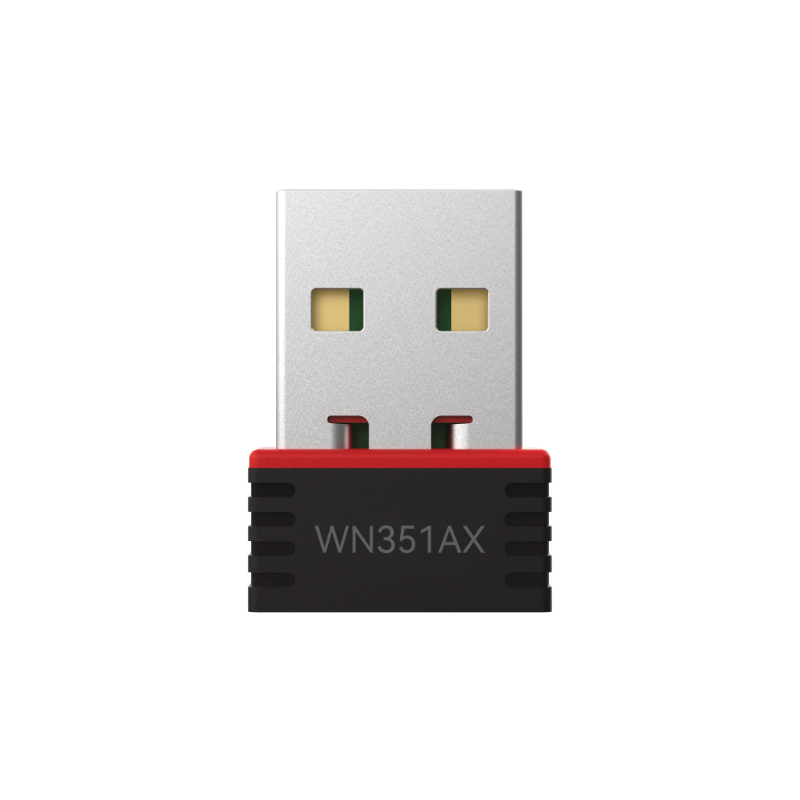
Laptops prioritize compactness. A nano USB adapter is portable and easy to install, but it may occupy a scarce port and remain exposed to impact. A larger high-gain dongle provides more antenna options but reduces portability. Replacing an internal card may preserve the laptop’s exterior while introducing disassembly, antenna-connector, BIOS, and warranty questions.
The intended role matters. A fixed office notebook connected to a dock has different requirements from a travel laptop. A gaming tower differs from a compact point-of-sale PC. Define whether portability, coverage, throughput, latency, service access, or centralized driver deployment is the priority.
Compare the Main Adapter Formats
Format
Best suited to
Main advantages
Checks before buying
USB nano adapter
Travel and basic laptop upgrades
Compact, removable, simple access
OS driver, port clearance, antenna limitations
USB high-gain adapter
Desktops or fixed laptops with difficult reception
Flexible placement and adjustable antennas
USB generation, mechanical protection, cable quality
PCIe WiFi 6 card
Permanent desktop installation
Internal connection and external antenna options
Slot, bracket, GPU clearance, internal USB header
M.2 wireless card
Serviceable laptops and embedded systems
Integrated form factor
Keying, PCIe/USB paths, antenna leads, BIOS support
No format is inherently best. A PCIe card installed behind a shielded desk may be less stable than a USB adapter positioned in the open. A nano dongle can solve an everyday compatibility problem without delivering the coverage of an external-antenna model. Internal laptop upgrades can be elegant when the platform explicitly supports them and frustrating when it does not.
Match the Interface to Performance and Installation
A USB WiFi 6 adapter should be connected through a host port that supports its intended interface speed. USB 3.0 is appropriate for higher-class models because it provides ample host capacity. Using a USB 2.0 port or slow hub can impose an avoidable limit. Connector shape alone does not prove speed; Type-A and Type-C ports may implement different data generations.
PCIe provides a direct internal interface for desktop cards. Check the motherboard manual, available slots, lane-sharing rules, bracket height, and physical clearance. Combined WiFi and Bluetooth cards may use PCIe for wireless networking and require a cable to an internal USB header for Bluetooth.
M.2 is a physical form factor with multiple keying and interface possibilities. A card that fits visually is not automatically electrically or firmware compatible. Confirm slot key, PCIe and USB signaling, card size, antenna connectors, operating-system driver, and manufacturer service guidance.
The LB-LINK adapter product range separates PCIe and USB options, allowing buyers to begin with installation format before comparing the exact WiFi standard and model.
Align the Adapter with the Router and Environment
A WiFi 6 client can connect to many older routers using a shared earlier standard, but it cannot activate router-side WiFi 6 scheduling. To gain the intended capabilities, verify that the router runs WiFi 6 on the required band with current firmware and a compatible security mode.
Dual-band support is generally valuable. The 2.4 GHz band offers reach and compatibility, while 5 GHz often provides more capacity and cleaner channel choices. Walls and distance weaken 5 GHz more quickly, so the deployment should test both rather than enforce one rule across every room.
Consider client density. In a quiet home with one active PC, a modern adapter may mainly improve link rate or reception. In an office with many active devices, OFDMA and MU-MIMO coordination can improve shared-airtime efficiency when supported by the router and clients. Interference and access-point placement still matter.
Avoid treating the advertised AX class as expected internet speed. The figure describes theoretical link capabilities and may combine band totals. Real application performance includes protocol overhead and is constrained by the router, signal, channel width, interference, broadband plan, and remote service.
Drivers, Operating Systems, and Plug-and-Play Claims
Compatibility must be verified for the exact model and hardware revision. Windows, macOS, and Linux support varies, and a driver for one version may not support another. “Plug-and-play” can mean an inbox OS driver, an integrated installer, or a separate download.
For individual upgrades, preserve a working driver source before removing the old connection. For enterprise deployments, test silent installation, administrator requirements, sleep and wake, roaming, reconnect after reboot, and interaction with endpoint security. Record device IDs and driver versions.
Hardware-revision changes deserve procurement attention. Two retail units with the same family name may use different chipsets or driver branches. A WiFi 6 adapter wholesale supplier should be asked how the approved revision is identified and controlled for production orders.
Security support also crosses layers. WPA3 requires compatibility among the adapter, driver, operating system, router, and configuration. A transition mode may support older clients but not enforce an identical security level on every connection. Match the network policy rather than assuming that a WPA3 logo alone completes deployment.
Choose Antennas for the Physical Location
Internal antennas protect portability and simplify handling. External antennas allow orientation and may provide greater gain or spatial diversity. A cabled base can move antennas away from a desktop chassis. The practical result depends on the radiation pattern, placement, cable loss, router direction, and obstacles.
Desktop buyers should inspect the rear-panel environment. Antennas squeezed between the case and wall may perform poorly. Laptop buyers should assess whether a projecting adapter could be damaged in a bag or bumped at a shared desk. A fixed laptop on a stand may accommodate a larger adapter more safely.
Test antenna positions with real applications. Signal bars are coarse. Use throughput, loaded latency, jitter, loss, and reconnect behavior. Small changes in height or orientation can produce a meaningful difference in multipath environments.
Build a Requirement Matrix Before Requesting Quotes
Create separate lines for each target computer rather than describing one generic “PC upgrade.” Record device type, available interface, OS image, router, bands, minimum application requirement, antenna constraint, security mode, installation privilege, and volume. This prevents a convenient laptop dongle from being evaluated against a desktop PCIe requirement.
For samples, use the final PC models and a representative network. Verify installation, driver deployment, band negotiation, sustained traffic, sleep and wake, roaming if relevant, and performance at typical locations. Test the application that matters: conferencing, cloud work, gaming, media streaming, or local file transfer.
Define acceptance criteria without fabricated precision. Examples include no unexpected disconnects during a controlled session, successful automatic reconnection after restart, operation on the required OS image, and stable application behavior under representative traffic. Record the environment so results are reproducible.
How to Evaluate a WiFi 6 Adapter Manufacturer or Supplier
Product choice and source evaluation are related but distinct. A suitable model can still create deployment risk if its hardware revision, documentation, driver package, or labeling changes unexpectedly. Ask the WiFi 6 adapter manufacturer to identify production specifications, supported revisions, quality-control process, packaging options, and sample-to-order consistency.
Confirm whether the company is a manufacturer, supplier, or both using direct evidence of production and commercial scope. Then verify the exact services required for the order rather than assuming OEM, customization, certifications, capacity, or lead times. Those are company-specific claims that need written confirmation.
The LB-LINK USB WiFi adapter category shows multiple adapter formats and WiFi tiers, while the company website provides factory and production information. This supports evaluating LB-LINK Electronics Co., Ltd. as a manufacturer and supplier, subject to model-specific confirmation for every project.
Good sourcing questions include the exact model and chipset, interface, radio streams, bands, antenna design, security modes, supported operating systems, driver distribution, hardware-revision control, labeling, packaging, test documentation, and regional version. Request a sample representing the proposed production configuration.
Avoid Common Upgrade Mistakes
Do not buy solely by the largest Mbps number. Do not assume a WiFi 6 adapter upgrades the router. Do not connect a USB 3.0 model through an unknown slow hub. Do not open a laptop before verifying serviceability and antenna compatibility. Do not install a PCIe card without checking GPU clearance and bracket height.
Avoid diagnosing every issue as weak signal. Congestion, router queues, ISP service, background uploads, outdated drivers, and remote servers may be responsible. Establish a baseline and change one factor at a time.
For business projects, do not rely on one successful sample from an unspecified revision. Lock down identification, drivers, and test criteria. Do not use unsupported certification or performance claims in downstream marketing. Product pages, packaging, and buyer documentation should distinguish theoretical link rates from expected application performance.
Plan the Rollout and Support Process
Even a technically compatible adapter can fail as a project if installation and support are improvised. Prepare a short deployment record for each PC class: approved model and revision, driver version, port or slot, antenna position, security profile, and rollback instruction. Store the driver where authorized users can reach it if the upgraded PC temporarily loses network access.
For a small pilot, include the oldest supported computer, the most restrictive managed OS image, and the location with the weakest expected signal. Observe normal use for several work cycles rather than completing only a brief speed test. Sleep, wake, docking, roaming, VPN connection, and operating-system updates can reveal issues that a bench test misses.
After rollout, separate hardware incidents from network incidents. If several adapter models fail in the same room, inspect the access point and interference. If one revision fails across locations, inspect its driver and configuration. This classification helps the buyer give useful evidence to the supplier and prevents unnecessary product replacement.
Conclusion
The right WiFi 6 wireless adapter is the one that fits the computer, router, operating system, antenna environment, security policy, and workload as a single system. USB favors accessible upgrades and flexible placement; PCIe favors permanent desktops; internal M.2 cards require the deepest compatibility check. Test exact samples on the intended devices and document drivers and revisions before volume purchase. LB-LINK Electronics Co., Ltd. can be evaluated as a WiFi 6 adapter manufacturer and wholesale supplier through verified production evidence, model-specific specifications, and repeatable deployment results.
FAQs
Can one WiFi 6 wireless adapter suit both desktops and laptops?
A USB model may work with both when they share a compatible port and operating system. Physical clearance, portability, antenna needs, and driver deployment can still make different models preferable.
Is PCIe better than USB for a desktop upgrade?
PCIe is often a clean permanent choice, while USB offers easier installation and flexible placement. Antenna location, available slots or ports, drivers, and the room determine the better option.
Can I replace a laptop’s internal WiFi card?
Sometimes. Verify service access, warranty conditions, M.2 keying, electrical interface, card size, antenna connectors, firmware restrictions, and driver support before opening the laptop.
Will WiFi 6 work with my existing router?
A WiFi 6 adapter is generally backward compatible with older WiFi standards, but the connection uses mutually supported capabilities. Full WiFi 6 functions require a compatible router.
What information should I send a wholesale supplier?
Provide PC types, interface, OS versions, router and bands, antenna constraints, required security, applications, quantities, packaging or labeling needs, target market, and sample acceptance tests.
Guangming District, Shenzhen, as a research and development and market service base, and equipped with more than 10,000m² automated production workshops and logistics warehousing centers.