Home / Solutions / BL-M8852DU4 Industrial IoT Gateway Deployment & Installation Guide

BL-M8852DU4 Industrial IoT Gateway Deployment & Installation Guide

Views: 0     Author: Site Editor     Publish Time: 2026-05-10      Origin: Site

Inquire

facebook sharing button
twitter sharing button
line sharing button
wechat sharing button
linkedin sharing button
pinterest sharing button
whatsapp sharing button
sharethis sharing button

SMT Tri-Band Wi-Fi 6E + Bluetooth 5.3 Module | Professional Implementation Guide

About This Solution

This guide focuses on the industrial IoT gateway implementation of BL-M8852DU4, including SMT soldering, hardware configuration, driver integration, RF testing, and on-site troubleshooting.

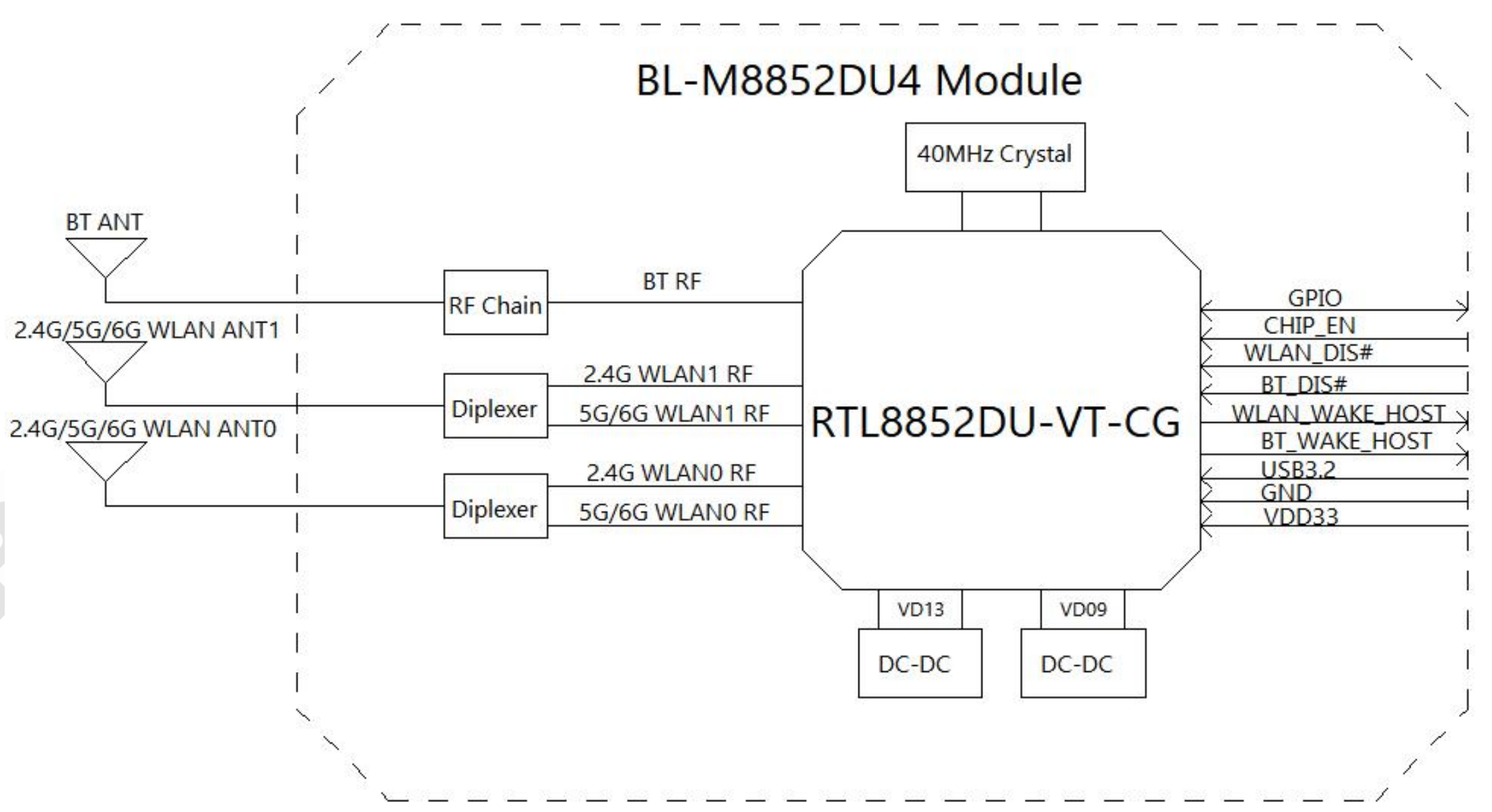
Module Structure & Hardware Diagram

BL-M8852DU4 Tri-Band Wi-Fi 6E + Bluetooth 5.3 Module Hardware Block Diagram

Hardware Block Diagram

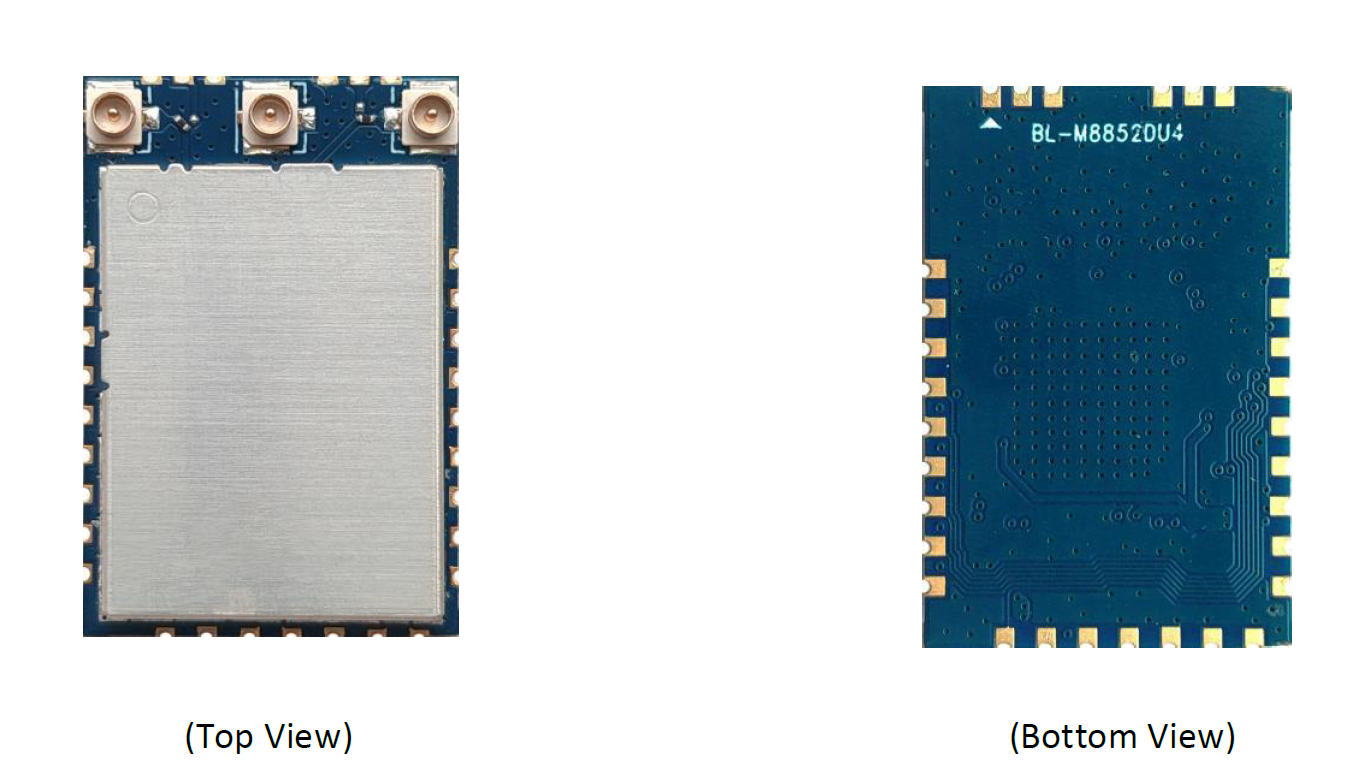
BL-M8852DU4 Tri-Band Wi-Fi 6E + Bluetooth 5.3 Module Top & Bottom View

Module Top & Bottom View

IoT Gateway Deployment & Installation Steps

Step 1: SMT Soldering & Hardware Integration

  1. SMT reflow soldering: peak temp 245±5℃
  2. Connect 3 IPEX antennas: WLAN_ANT0, WLAN_ANT1, BT_ANT
  3. Power: VDD33 = 3.3V, RMS ≥1A, Peak ≥1.5A
  4. USB 3.2 Gen1 + USB 2.0 differential pair layout: 90Ω±5Ω

Step 2: Pin Configuration

  • CHIP_EN: pull high to enable module
  • WL_DIS# / BT_DIS#: pull low to disable function
  • WL_WAKE / BT_WAKE: connect to host MCU for wake-up
  • GPIO: for LED, reset, or status indication

Step 3: Driver & System Integration

  • Linux kernel 4.x+ driver compilation & .ko loading
  • Tri-band (2.4G/5G/6G) parameter configuration
  • Bluetooth 5.3 LE+BR/EDR coexistence tuning
  • Disable power-saving for 24/7 industrial operation

Step 4: RF & Reliability Test

  • Verify 6GHz band throughput up to 2402Mbps
  • Check Wi-Fi & Bluetooth coexistence without interference
  • High-low temperature aging test (-20℃~+70℃)
  • ESD & anti-interference validation for industrial sites

Common Troubleshooting

Power & Module Detection Issues

- Check SMT soldering (USB pads, VDD33, GND)
- Confirm CHIP_EN pulled high
- Verify power voltage & current

Wi-Fi Low Throughput

- Switch to 6GHz band
- Optimize antenna position & matching
- Reinstall official RTL8852DU driver

Bluetooth Disconnection

- Replace BT antenna
- Keep away from metal barriers
- Disable 2.4G Wi-Fi if not required

Overheating & Stability

- Add heat dissipation area on PCB
- Improve ventilation
- Check for overcurrent in power supply

Best Applications for Industrial IoT Gateways

  • Industrial IoT Gateways & Data Collection Terminals
  • Factory Automation & Wireless Sensor Networks
  • High-Definition Industrial Cameras
  • Harsh-Environment Monitoring Equipment
  • Smart Factory Control Systems

Get Full Industrial Solution Support

Download datasheet, driver, schematic, SMT guide & customization service for your IoT gateway project.

Get Full Resources Now

Guangming District, Shenzhen, as a research and development and market service base, and equipped with more than 10,000m² automated production workshops and logistics warehousing centers.

Quick Links

Leave a Message
Contact Us

Product Category

Contact Us

  +86-13923714138
 +8613923714138
  Business Email: sales@lb-link.com
  Technical support: info@lb-link.com
  Complaint email: complain@lb-link.com
  Shenzhen Headquarter: 10-11/F, Building A1, Huaqiang idea park, Guanguang Rd, Guangming new district, Shenzhen, Guangdong, China.
 Shenzhen Factory: 5F, Building C, No.32 Dafu Rd, Longhua District, Shenzhen, Guangdong, China.
Jiangxi Factory: LB-Link Industrial Park, Qinghua Rd, Ganzhou, Jiangxi, China.
​Copyright © 2024 Shenzhen Bilian Electronic Co., Ltd. All rights reserved. | Sitemap | Privacy Policy