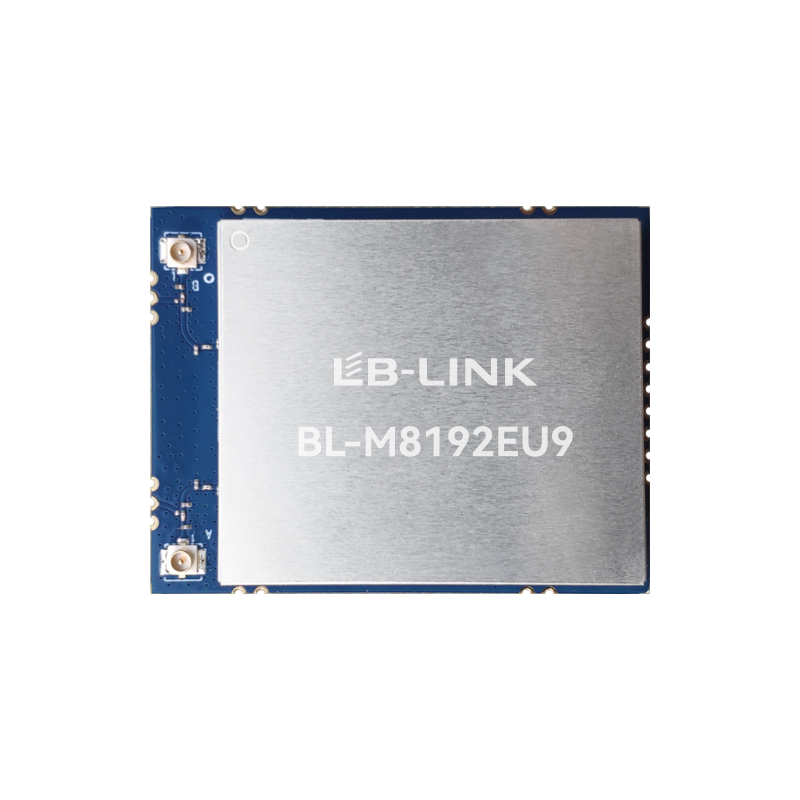
Are dropped connections ruining your smart device deployments? Physical barriers often block weak wireless signals. This leads to frustrating user experiences and costly system failures in the field. A 2.4G Wi-Fi Module solves this pervasive connectivity problem. It penetrates walls and resists physical interference with remarkable efficiency. In this post, we will explore the underlying frequency physics, advanced radio frequency mitigation techniques, and critical hardware choices making this resilient performance possible.
Key Takeaways
Superior Penetration: A 2.4G Wi-Fi Module utilizes longer radio wavelengths. This physical trait fundamentally allows the wireless signal to penetrate physical obstacles like concrete walls, metal framing, and heavy furniture far more effectively than higher-frequency alternatives.
Built-in Noise Mitigation: Despite operating in a densely populated radio band, modern modules deploy advanced modulation techniques. These mathematical defenses maintain stable, reliable connections amidst heavy background noise.
Interface Flexibility: Selecting the appropriate hardware interface is a critical engineering decision. Whether integrating an SDIO WiFi Module for tightly coupled embedded systems or utilizing a USB interface for rapid deployment, the hardware layer dictates overall device performance.
Cost-Effective Sourcing: Strategic procurement from a reputable manufacturer ensures access to highly reliable, scalable, and globally certified hardware solutions. This ultimately drives better return on investment.
The Physics of 2.4GHz: Why It Beats Physical Interference
To fully grasp why these modules excel in complex physical environments, one must examine the fundamental principles of electromagnetic physics. The behavior of a wireless wave when it encounters an obstacle is primarily determined by its frequency and corresponding wavelength.
Understanding Wavelengths and Obstacle Penetration
In radio physics, frequency and wavelength share an inverse relationship. For a 2.4GHz signal, the wavelength measures approximately 12.5 centimeters. In stark contrast, a 5GHz signal possesses a much shorter wavelength of roughly 6 centimeters.
This physical difference dictates real-world performance. When an electromagnetic wave encounters a solid object—such as a brick wall, wooden door, or drywall—it undergoes reflection, absorption, and diffraction. Shorter 5GHz wavelengths are easily absorbed by dense materials. This causes the signal to degrade rapidly. The longer 12.5-centimeter waves of a 2.4GHz module, however, are naturally equipped to diffract around edges. They pass through solid, non-metallic objects with minimal energy loss. Consequently, in a multi-room house or a partitioned office, a 2.4GHz signal maintains structural integrity through multiple walls where higher frequencies would simply fail.
Attenuation and Signal Distance
Signal attenuation refers to the gradual loss of signal strength as it travels through a medium. In wireless communications, Free Space Path Loss dictates that attenuation increases exponentially with both distance and frequency. Because 2.4GHz operates at a lower frequency, it experiences a significantly lower rate of free-space attenuation.
Empirical field data demonstrates that a standard module can maintain a usable connection at much greater distances. Engineers routinely observe stable connections up to 50 meters indoors and over 100 meters outdoors under optimal conditions. This extended operational range makes 2.4GHz technology the pragmatic choice for distributed Internet of Things networks. Devices such as remote agricultural sensors, warehouse inventory scanners, and perimeter security cameras rely heavily on this low-attenuation characteristic to transmit data reliably back to a central access point.
How a 2.4G Wi-Fi Module Handles Airspace Interference
While the 2.4GHz frequency is physically robust against solid obstacles, it faces a completely different challenge in the air. The airspace is highly congested. Understanding how these modules survive in a noisy environment requires looking at the mathematical modulation schemes engineered to protect data integrity.
The Crowded Industrial and Scientific Radio Band
The 2.4GHz frequency operates within the Industrial, Scientific, and Medical radio band. Originally reserved internationally for non-telecommunications purposes, this unlicensed spectrum is now heavily shared by a vast array of consumer and industrial devices. A standard module must share the airspace with microwave ovens, Bluetooth peripherals, Zigbee smart home hubs, and wireless baby monitors.
Historically, this overlapping usage caused severe packet collisions and data loss. When multiple devices transmit at the exact same frequency simultaneously, the receiver experiences a raised noise floor. Modern Wi-Fi modules, however, are not passive receivers. They are equipped with sophisticated technological defenses.
Technological Defenses: DSSS, OFDM, and Channel Hopping
To slice through the background noise, modern modules utilize advanced digital modulation techniques. The first line of defense is Direct-Sequence Spread Spectrum. This technique takes the original data signal and multiplies it with a spreading code, distributing the data across a wider bandwidth. Even if narrow-band interference corrupts a portion of the frequency, the receiver can mathematically reconstruct the original data using the uncorrupted parts of the spread signal.
Furthermore, for higher data rates, modules employ Orthogonal Frequency-Division Multiplexing. This method divides a single Wi-Fi channel into numerous smaller, overlapping subcarriers. Because these subcarriers are mathematically perpendicular, they do not interfere with one another. If interference spikes on specific subcarriers, the system dynamically shifts the data payload to clear pathways. This ensures continuous transmission.
In addition, intelligent Wi-Fi modules utilize automatic channel selection. By dynamically hopping to non-overlapping channels—specifically Channels 1, 6, and 11—the module actively evades congested frequencies to secure a stable communication link.
2.4GHz vs. 5GHz: Which Wi-Fi Module Wins in Harsh Environments?
Engineers and product managers frequently face the decision of whether to integrate a 2.4GHz or a 5GHz module into their hardware designs. Industry analysts currently observe a fascinating trend within the Internet of Things sector. Edge computing and smart industrial networks are rapidly expanding. While consumer marketing pushes Wi-Fi 7 on 6GHz bands for ultra-high-definition streaming, commercial deployments tell a different story. Market data indicates a surging demand for 2.4GHz modules in smart home and industrial automation. Field engineers prioritize relentless connection stability over sheer gigabit speed. Transmitting critical telemetry data requires absolute reliability, not massive bandwidth.
Core Specification Comparison
To clarify the engineering trade-offs, we must evaluate the core performance metrics of both frequency bands.
Performance Metric
2.4GHz Module
5GHz Module
Obstacle Penetration
Excellent. Easily passes through concrete and brick.
Poor. Rapidly degrades through solid walls.
Maximum Range
Up to 50m indoors / 100m outdoors.
Up to 15m indoors / 30m outdoors.
Data Throughput
Adequate. Up to 150Mbps to 300Mbps.
Extremely High. Often exceeds 1Gbps.
Power Consumption
Generally lower, ideal for battery devices.
Higher, requiring better thermal management.
Best Use Cases
Smart home sensors, industrial telemetry, IP cameras.
4K video streaming, augmented reality headsets.
Understanding Received Signal Strength Indicator
To objectively measure signal quality in harsh environments, engineers rely on the Received Signal Strength Indicator. Measured in decibel-milliwatts, a value closer to zero indicates a stronger signal. In non-line-of-sight environments where the signal must pass through floors and walls, a 2.4GHz module typically registers a significantly healthier score than a 5GHz module placed in the exact same location.
For instance, testing an IP camera behind two reinforced concrete walls might yield a highly stable connection of -65 decibel-milliwatts on 2.4GHz. Conversely, the 5GHz module might register at -88 decibel-milliwatts. This weak signal results in dropped packets or complete authentication failure. Ensuring a healthy signal strength in unpredictable user environments is the primary reason hardware developers default to 2.4GHz.
Choosing the Right Hardware Interface for Your Project
Selecting the correct frequency is only half the battle. The physical and logical interface between the Wi-Fi module and the host device mainboard dictates power consumption, data latency, and the complexity of the manufacturing process.
The Advantages of a Wireless SDIO Module
A Secure Digital Input Output interface is highly favored by engineers developing embedded systems, smart home hubs, and battery-operated devices. Integrating a Wireless SDIO Module offers distinct architectural benefits. It communicates directly with the host microcontroller via a local bus, providing ultra-low latency.
For example, modern modules utilizing a 1T1R architecture with IEEE 802.11b/g/n compliance deliver up to 150Mbps physical rates while maintaining a microscopic footprint. Because these modules are soldered directly onto the printed circuit board via surface-mount technology, they save valuable space. When designing a densely packed smart thermostat board, every millimeter counts. Furthermore, SDIO modules generally consume less power than alternative interfaces, making them the standard choice for devices where thermal management and battery life are critical constraints.
When to Use a Mini USB WiFi Wireless Internet Module
Conversely, some product architectures prioritize rapid development, modularity, and plug-and-play functionality over microscopic footprints. In these scenarios, utilizing a Mini USB WiFi Wireless Internet Module becomes the optimal engineering choice.
USB interfaces rely on standard Universal Serial Bus protocols. The distinct advantage here is universal compatibility. A standard 1T1R USB module provides up to 150Mbps throughput and can be easily integrated into industrial computers, set-top boxes, digital signage displays, and legacy device upgrades without requiring complex board redesigns. Since the USB protocol handles much of the hardware-level enumeration automatically across Windows, Linux, and Android systems, it significantly accelerates time-to-market with minimal research and development overhead.
Top Applications That Rely on Resilient Connectivity
The theoretical benefits of 2.4GHz technology translate directly into tangible reliability across multiple industries. By examining real-world applications, procurement officers can validate their hardware choices.
Smart Home and Consumer Electronics
The smart home ecosystem is arguably the largest consumer of 2.4GHz modules. Devices such as smart plugs, Wi-Fi-enabled LED bulbs, and smart thermostats rely almost exclusively on this band. A consumer wireless router is typically located in a central living room, but smart devices are distributed throughout the house—often in basements or behind heavy appliances. A smart doorbell camera mounted on an exterior brick wall requires superior wall penetration to maintain a continuous video feed, a feat higher frequencies simply cannot reliably achieve.
Industrial Internet of Things and Remote Monitoring
In industrial settings, the tolerance for dropped packets is near zero. Picture a sprawling automated warehouse. Towering metal racks and moving forklifts create a constantly shifting maze of radio barriers. Industrial applications—such as predictive maintenance sensors on factory floors or remote soil moisture sensors in agricultural fields—operate in these harsh environments.
In these deployments, long-range stability is non-negotiable. A dedicated 2.4GHz module ensures that critical telemetry data reaches the industrial gateway even when the line of sight is completely obstructed by heavy manufacturing equipment.
How to Source the Best Quality Hardware
For enterprise buyers and hardware procurement teams, transitioning from product design to mass production requires securing a reliable supply chain. Sourcing components is a delicate balance of cost, quality, and long-term availability.
Why Source from Top Asian Manufacturers?
Sourcing a China 2.4G Wi-Fi Module offers distinct strategic advantages. Over the past two decades, Chinese manufacturers have developed the world most mature and highly integrated electronic supply chains. This maturity translates to cost-effectiveness at scale, allowing brands to maintain competitive retail pricing.
Beyond simple assembly, leading module manufacturers possess advanced research capabilities, stringent quality assurance protocols, and in-house testing laboratories. They provide comprehensive firmware support and customized antenna matching services. This ensures that the module performs optimally within the specific housing of the final product.
Key Specs to Evaluate Before Purchasing
When evaluating potential suppliers, procurement officers should utilize a strict technical checklist to ensure the module meets enterprise standards. First, verify the antenna design. Determine if the module uses a 1T1R architecture for cost-efficiency, or a 2T2R configuration—supporting up to 300Mbps—for enhanced multiple-input and multiple-output performance. Next, ensure strict adherence to IEEE 802.11b/g/n standards to guarantee backward compatibility with legacy routers.
Operating temperature is another vital metric. While consumer modules typically support 0 to 70 degrees Celsius, industrial applications demand extended ranges, often -40 to 85 degrees Celsius. Finally, the module must possess valid FCC, CE, and RoHS certifications to ensure legal market entry and environmental compliance.
Conclusion
While the 2.4GHz band is undeniably crowded, a high-quality 2.4G Wi-Fi Module is explicitly engineered to tolerate both physical and radio interference better than any alternative frequency. Its longer wavelengths effortlessly penetrate walls and floors. Meanwhile, advanced modulation techniques slice through background noise. By carefully selecting the right hardware interface—whether SDIO for embedded efficiency or USB for rapid integration—and sourcing from reputable manufacturers, engineers can guarantee relentless connectivity for their next generation of smart devices. Ready to upgrade your device connectivity? Evaluate your specific project requirements and explore high-performance hardware solutions from industry-leading manufacturers. Visit LB-Link today to find the exact Wi-Fi module tailored to your engineering needs.
Frequently Asked Questions
Q1: Why do smart home devices only use a 2.4G Wi-Fi Module?
Smart home devices primarily utilize the 2.4GHz frequency because its longer radio wavelengths excel at penetrating solid objects like drywall, concrete floors, and wooden framing. A 2.4GHz module ensures that devices like smart plugs and security cameras maintain a continuous, stable connection regardless of physical barriers, whereas a 5GHz signal would drop significantly under the same conditions.
Q2: What is the difference between an SDIO WiFi Module and a USB WiFi module?
The primary difference lies in hardware integration and communication protocols. An SDIO module connects directly to a device microcontroller via a local bus, offering an ultra-small footprint and extremely low power consumption for battery-operated embedded systems. A USB module connects via a standard differential USB interface, offering simple plug-and-play integration with standardized drivers, making it perfect for industrial computers and legacy upgrades.
Q3: Can a 2.4G Wi-Fi Module avoid microwave and Bluetooth interference?
Yes. Although microwaves and Bluetooth devices share the crowded radio band, modern 2.4GHz modules are engineered with advanced mitigation technologies. They utilize Orthogonal Frequency-Division Multiplexing to slice through background noise and employ automatic channel switching to dynamically shift to the least congested channels, establishing clear data pathways despite surrounding interference.
Q4: How does a 2.4G Wi-Fi module affect battery life in IoT devices?
Compared to higher frequency modules, a 2.4GHz module generally consumes less peak power during transmission and reception. When paired with an SDIO interface and optimized firmware sleep states, it allows battery-operated sensors to run for months or even years. The excellent wall penetration also means the device spends less battery power attempting to retransmit dropped packets.
Q5: What antenna configuration is best for a 2.4GHz module in high-interference areas?
For environments with extreme interference or physical obstructions, upgrading from a standard 1T1R antenna to a 2T2R configuration is highly recommended. A 2T2R setup utilizes multiple-input and multiple-output technology. This allows the module to transmit and receive multiple data streams simultaneously, significantly improving signal reliability and overall throughput in harsh conditions.
Q6: How do I improve the signal strength of my Mini USB WiFi Wireless Internet Module?
To improve the Received Signal Strength Indicator, start by optimizing the physical placement of the module. Keep it away from large metal enclosures that cause signal attenuation. Ensure the device firmware is fully updated, and manually configure your local router to broadcast on a non-overlapping 2.4GHz channel, specifically Channel 1, 6, or 11, to minimize co-channel interference from neighboring networks.
Q7: Is it safe to buy a China 2.4G Wi-Fi Module for enterprise products?
Absolutely. The vast majority of the world commercial and industrial networking hardware is manufactured in China. Leading Chinese manufacturers operate highly sophisticated, ISO-certified facilities. They produce modules utilizing premium chipsets and ensure their hardware passes strict global regulatory standards, including FCC, CE, and RoHS certifications, guaranteeing enterprise-grade reliability.
Guangming District, Shenzhen, as a research and development and market service base, and equipped with more than 10,000m² automated production workshops and logistics warehousing centers.